

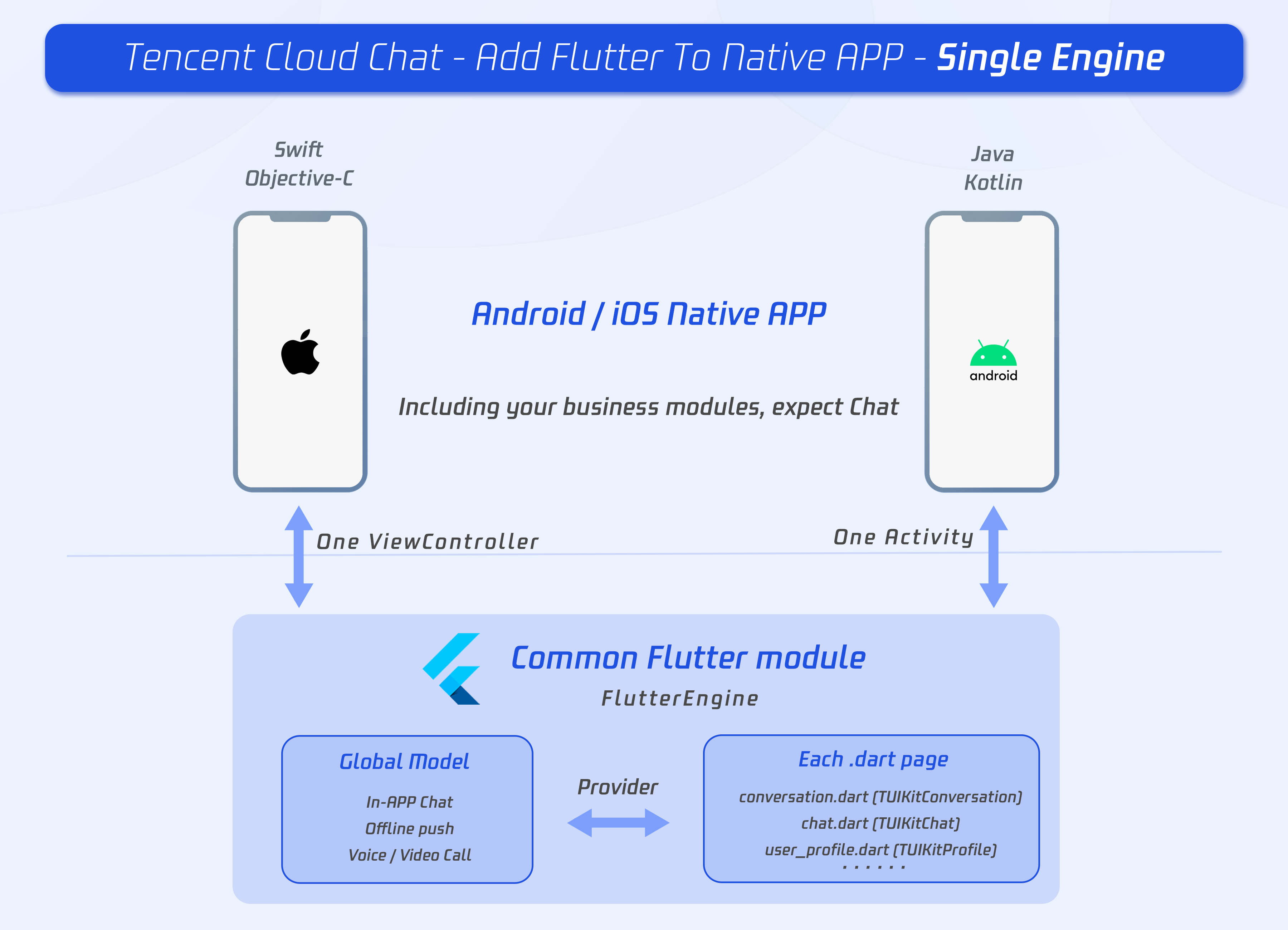
Flutter’s add-to-app model is a lifesaver when you already have a large native Android/iOS codebase but want to ship new features faster.
A very common requirement in this setup is:
Open a Flutter screen from native code and pass data to it safely
This blog covers multiple proven approaches, when to use each one, and real-world tradeoffs.
Why Add Flutter to an Existing App?
Instead of rewriting your entire app in Flutter, add Flutter incrementally:
- Ship new features faster
- Share UI across Android & iOS
- Keep native modules untouched
- Migrate screen-by-screen
Flutter officially supports this via Add-to-App.
The Core Problem
You have:
- A native Android / iOS screen
- You navigate to a Flutter screen
You want to pass data like:
- userId
- auth token
- feature flags
- config values
So… how do you do it cleanly?
Approach 1: Pass Data via Initial Route (Simplest & Cleanest)
When to use
- Data is known before navigation
- One-time payload
- No need to update data after Flutter loads
Android (Kotlin)
val intent = FlutterActivity
    .withNewEngine()
    .initialRoute("/profile?userId=123&theme=dark")
    .build(this)

startActivity(intent)
iOS (Swift)
let flutterVC = FlutterViewController(
  project: nil,
  initialRoute: "/profile?userId=123&theme=dark",
  nibName: nil,
  bundle: nil
)

navigationController?.pushViewController(flutterVC, animated: true)
Flutter Side
void main() {
  runApp(MaterialApp(
    onGenerateRoute: (settings) {
      final uri = Uri.parse(settings.name ?? "");
      if (uri.path == '/profile') {
        return MaterialPageRoute(
          builder: (_) => ProfileScreen(
            userId: uri.queryParameters['userId'],
            theme: uri.queryParameters['theme'],
          ),
        );
      }
      return null;
    },
  ));
}
Pros & Cons
✅ Zero platform channels ✅ Very easy to debug ❌ Limited payload size ❌ Not reactive after launch
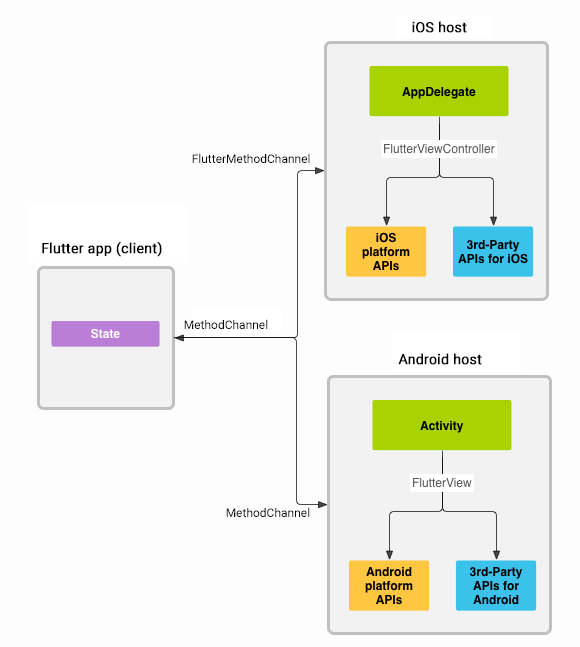
Approach 2: MethodChannel (Most Common in Production)
This is the most widely used approach in real apps.
When to use
- Complex or structured data
- Data arrives after Flutter loads
- Two-way communication needed
Native → Flutter
Android
MethodChannel(
  flutterEngine.dartExecutor.binaryMessenger,
  "app.channel"
).invokeMethod("initData", mapOf(
  "userId" to 123,
  "token" to "abc"
))
iOS
channel.invokeMethod("initData", arguments: [
  "userId": 123,
  "token": "abc"
])
Flutter Side
static const channel = MethodChannel('app.channel');

@override
void initState() {
  super.initState();
  channel.setMethodCallHandler((call) async {
    if (call.method == "initData") {
      final data = Map<String, dynamic>.from(call.arguments);
      print(data['userId']);
    }
  });
}
Pros & Cons
✅ Flexible ✅ Async safe ✅ Two-way bridge ❌ String-based contracts ❌ Runtime errors if API breaks
Approach 3: Pigeon (Strongly Typed & Scalable)
If you’re building a large production app, this is the best long-term solution.
When to use
- Multiple Flutter screens
- Long-term maintenance
- You care about type safety
Pigeon API Definition
@HostApi()
abstract class NativeApi {
  InitData getInitData();
}

class InitData {
  String userId;
  String token;
}
Pigeon generates:
- Kotlin interfaces
- Swift protocols
- Dart bindings
Flutter Usage
final data = await NativeApi().getInitData();
Pros & Cons
✅ Compile-time safety ✅ Clean contracts ✅ Scales extremely well ❌ Initial setup cost ❌ Code generation step
Advanced Communication Options
EventChannel
Use when:
- Continuous updates
- Streaming data (location, sensors, socket events)
Shared Storage (Avoid If Possible)
- SharedPreferences / UserDefaults
- Race conditions
- Hard to debug
- Not recommended for critical data
Flutter Engine Lifecycle Matters
Real-world pitfalls you must consider:
- Don’t send data before Flutter is ready
- Cache data on native side if needed
- Prefer a single shared FlutterEngine
Decide between:
- New engine per screen
- Reused engine across app
Recommended Strategy (Production Ready)
| Use Case | Best Choice |
|---|---|
| Simple navigation data | Initial Route |
| Dynamic / async data | MethodChannel |
| Large app, long term | Pigeon |
💡 Best practice: Use Initial Route for boot data + Pigeon for ongoing communication
Final Thoughts
Flutter add-to-app isn’t a hack — it’s a first-class architecture supported by Flutter.
If done right:
- Native stays native
- Flutter stays clean
- Data contracts stay stable
This hybrid approach is already powering large-scale production apps with millions of users.